Introduction
Compliant WhatsApp messaging depends on two things: clear consent and well-built templates.
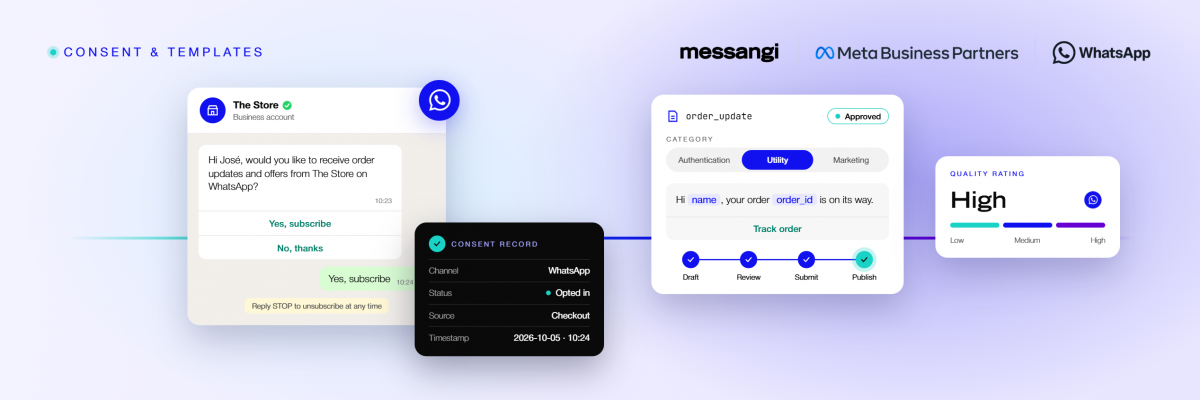
Consent management records opt-in and opt-out, while templates follow WhatsApp’s categories and approval rules.
Together, these WhatsApp template best practices support sender quality and keep campaigns moving.
This guide explains how businesses can manage both without slowing their operations.
Key Takeaways
- WhatsApp’s business policies require explicit opt-in, stored before any business-initiated template message is sent.
- Templates fall into authentication, utility, and marketing categories, each with its own rules and approval.
- Quality ratings depend on sending relevant, expected messages that customers do not block or report.
- Consent Management and Message Templates work best in one platform, not separate tools.
Why does consent come first in WhatsApp messaging?
WhatsApp is a personal channel, so its business policies require explicit opt-in before a business sends a template message. Consent is not a one-time checkbox, however; it must be stored and easy to withdraw. Local laws may add further requirements, so legal teams should confirm the rules for each country. The channel comparison shows how consent rules differ across SMS, WhatsApp, RCS, and email.
- Explicit opt-in: the customer actively agrees to receive messages, with a clear description of what arrives.
- Stored and timestamped: each consent record is kept, so the business can prove it later.
- Easy opt-out: customers can stop messages at any time, which protects trust and quality.
- Channel-specific: opt-in for WhatsApp is separate from SMS or email consent.
What are the WhatsApp template categories?
Every business-initiated WhatsApp message starts from a template, and each template belongs to a category. The category sets the rules, the pricing, and the content that is allowed. Choosing the right one, therefore, helps avoid rejections and delivery problems. Banks use authentication templates for logins, as explained in WhatsApp Business API for banking.
- Authentication: one-time passwords and verification codes, kept short and free of marketing.
- Utility: transactional updates tied to an action, such as order or payment confirmations.
- Marketing: promotions, offers, and re-engagement, which require the clearest opt-in.
- Right category, right content: mismatched content is a common reason templates get rejected.
How does template approval work?
Templates need WhatsApp approval before they can be sent. The review checks content, category, and formatting, so a clear template is easier to review. Clear category choice and complete opt-out language also make review smoother. A staged process, below, keeps approvals predictable.
A template from draft to approval
- Draft: write the message, choose the category, and add variables for personalization.
- Review internally: check tone, category fit, and required opt-out language.
- Submit: send the template to WhatsApp for review through the provider.
- Publish: once approved, the template is ready for Broadcast or Automations.
Rejected templates can be edited and resubmitted, so early testing saves time later.
What makes a high-quality WhatsApp template?
Quality is not only about approval; it is about how customers respond. Relevant, expected messages keep the sender rating healthy, while spam-like content lowers it. A lower rating, in turn, can limit how many messages a number can send. Timing matters as well, since a message that arrives at the wrong moment feels like noise.
- Clear value: every message gives the customer a reason to read it, such as an update or reminder.
- Personalized variables: names and order details make messages relevant, not generic.
- Concise content: short, direct copy fits the channel and can reduce opt-outs.
- Actionable buttons: quick-reply and call-to-action buttons can reduce friction for the customer.
How do consent and templates affect quality rating?
WhatsApp measures quality through customer signals, especially blocks and reports. High opt-out or block rates indicate poor targeting, and they can restrict messaging capacity. Consent management and template quality, together, help keep those signals healthy.
- Blocks and reports: these directly lower the quality rating and can cap sending.
- Opt-in accuracy: messaging only consented contacts reduces complaints.
- Frequency control: sending only when there is real value avoids fatigue.
- Segmentation: relevant audiences receive relevant templates, which protects the rating.
What common mistakes should businesses avoid?
A few recurring mistakes cause most template and consent problems, so awareness helps. Each one is easy to prevent with a simple checklist before every send.
- Missing opt-in: sending without stored consent risks blocks and policy violations.
- Wrong category: labeling a promotion as utility can lead to rejection or penalties.
- Generic blasts: irrelevant messages to broad lists raise block rates.
- No opt-out path: customers who cannot leave will report messages instead.
How should businesses manage consent and templates at scale?
As volume grows, manual tracking breaks down, so centralization matters. A single system keeps consent records, template status, and reporting aligned. That alignment can reduce errors and help keep audits simple. A shared library also lets new team members reuse proven templates instead of starting from scratch.
- One consent record: opt-in and opt-out live in one place across channels.
- Template library: approved templates are organized, versioned, and reused.
- Unified reporting: delivery and quality data sit in one view.
- Clear ownership: marketing and compliance work from the same source.
Where should businesses collect WhatsApp opt-in?
Opt-in works best when it is collected in context, at a moment the customer expects it. Clear placement and plain language raise consent quality and reduce complaints later.
- At signup or checkout: a clear WhatsApp opt-in sits beside the phone field.
- In the chat itself: a first message can confirm the customer wants to continue.
- Through a keyword: customers text a word to opt in, creating a clear record.
- With plain language: the request states what messages arrive and how often.
How does message frequency affect results?
Frequency shapes both engagement and quality, so it deserves a clear policy. Too many messages raise opt-outs, while too few lose the channel’s value. A steady, relevant cadence keeps customers engaged and ratings healthy. Consistency, over time, builds the trust that keeps customers subscribed.
- Value first: send when there is a real update, offer, or reminder.
- Respect quiet hours: timing that fits the customer reduces complaints.
- Segment cadence: different audiences tolerate different frequencies.
- Watch the signals: rising opt-outs mean the cadence needs adjusting.
How does Messangi support consent and templates?
Managing consent and templates across separate tools invites errors, and it slows campaigns. Messangi handles both inside one Communications Platform, so records and templates stay aligned. Messangi holds official WhatsApp for Business Technical accreditation as a Select Business Partner, so it also supports approval.
- Consent Management: opt-in and opt-out rules are enforced before messages are sent.
- Message Templates: templates are organized, submitted for approval, and reused across Broadcast and Automations.
- Guided approval: an accredited partner supports template submission and review.
- Unified reporting: Analytics & Reporting show delivery and performance in one view.
More than 300 companies send messages through Messangi. The company brings more than two decades in the region.
Frequently Asked Questions (FAQs)
Does my business need opt-in before sending WhatsApp templates?
Yes, WhatsApp’s business policies require explicit opt-in, and it should be stored before any business-initiated template message is sent.
What happens if a template uses the wrong category?
It may be rejected or penalized, so template content must match the chosen category.
Can my company reuse an approved WhatsApp template?
Yes, approved templates can be reused across Broadcast and Automations until content changes.
How does a low quality rating affect messaging?
A low rating can limit how many messages a number sends until quality improves.
How can my business reduce opt-outs on WhatsApp?
Send relevant, expected messages with clear value, and respect frequency and opt-out choices.
Conclusion
Consent and templates are the foundation of compliant WhatsApp messaging.
Clear opt-in, correct categories, and quality content support healthy quality ratings.
Messangi manages consent and WhatsApp template best practices in one platform, with guided approval.
That alignment helps businesses manage consent and templates in one place as volume grows.