Introduction
Customer data protection and account security are now non-negotiable standards for every business.
Multi-factor authentication (MFA) is the most reliable way to protect user accounts from unauthorized access.
The WhatsApp Business API offers a dedicated, high-speed solution for delivering these critical security codes.
Understanding WhatsApp authentication template use cases for secure logins shows you how to integrate security into the user experience.
Key Takeaways
- WhatsApp authentication template use cases for secure logins focus on delivering one-time passcodes (OTPs) quickly and reliably.
- These templates offer higher security and better conversion rates than traditional SMS methods.
- Authentication templates have a unique structure and include a dedicated one-time password button for user convenience.
- Utilizing a BSP like Messangi ensures fast delivery, robust security, and simplified deployment across all your login processes.
The Need for Speed in Secure Access
How often have you been waiting for a security code to arrive just to access your own account? Waiting for security codes via SMS can be frustrating and cause users to drop off during login. For large enterprises, these delays pose a serious risk to user experience. WhatsApp authentication templates solve this by delivering codes instantly and reliably.
Why WhatsApp Beats Traditional SMS for OTP?
- Speed and Reliability: Delivery over the WhatsApp network is often quicker and more reliable than SMS, minimizing user friction.
- Enhanced Security: WhatsApp messages include native security features and are less susceptible to certain interception methods than standard text messages.
- User Familiarity: Customers are already using WhatsApp constantly, making it a familiar, trusted channel for sensitive information.
WhatsApp Authentication Template Use Cases for Secure Logins
Authentication templates are designed exclusively for sending one-time passwords (OTPs) to verify user identity. They are governed by specific rules to prevent misuse, focusing solely on security.
Case 1: Multi-Factor Authentication (MFA)
This is the most essential use case: WhatsApp sends verification codes when users log in from a new device, perform high-value transactions, or use multi-factor authentication.
- The Scenario: A bank client attempts to log into their mobile banking app.
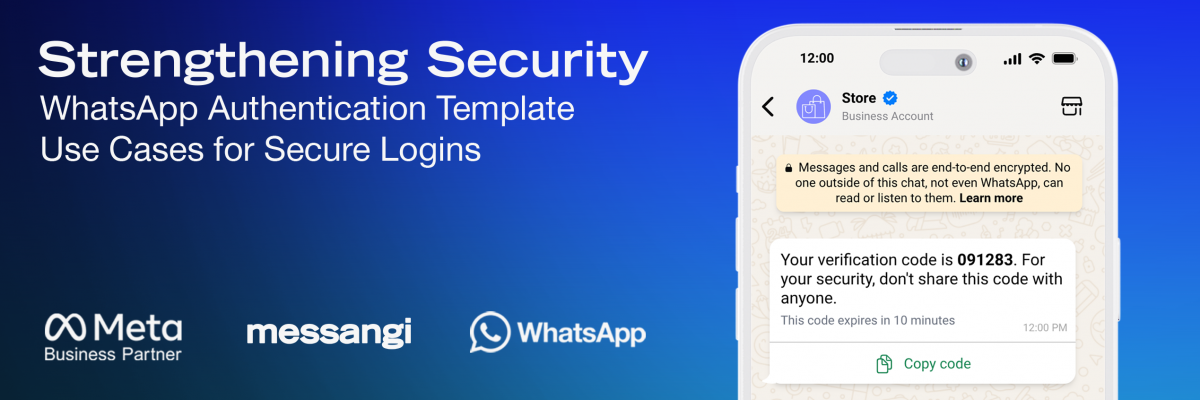
- The Template Action: The system uses the WhatsApp Business API to send a six-digit code and input button directly to the customer, streamlining authentication and avoiding manual entry errors.
Case 2: Account Recovery and Password Resets
When users forget their password, WhatsApp offers a fast, secure way to regain access, avoiding delays common with email or SMS.
- The Scenario: An e-commerce customer initiates a “Forgot Password” process.
- The Template Action: WhatsApp authentication templates send time-sensitive codes that let users reset passwords instantly, minimizing delays and quickly restoring access. This is key for secure login experiences.
Case 3: Identity Verification During High-Value Transactions
For businesses handling large sums of money, such as fintech platforms or insurance companies, an extra layer of real-time identity check is essential before confirming a major action.
- The Scenario: A user on a trading platform tries to withdraw a significant amount of funds.
- The Template Action: WhatsApp sends a unique verification code to confirm the account holder’s approval, instantly reducing fraud risk.
Designing and Deploying Authentication Templates
Template Structure and Requirements
- Content: The message body must contain the OTP, typically delivered through a variable ({{1}}). The message is purely functional, containing minimal supporting text.
- The OTP Button: These templates include a button to instantly copy the code, minimizing errors and speeding up MFA. An optional second button can offer account recovery support.
- Time Limit: These templates can include a configurable expiration time (e.g., 5, 10, or 15 minutes) for the code to remain valid, enforcing strong security practices.
Using Messangi’s platform ensures your WhatsApp authentication templates meet Meta’s formatting rules, get approved quickly, and integrate smoothly with your backend, while Messangi manages the API connection.
FAQs
Are WhatsApp authentication templates free to send?
No. Although they’re a distinct category, authentication templates are still business-initiated messages and follow Meta’s conversation-based pricing model.
Can I use an authentication template to send general promotional messages?
Absolutely not. Authentication templates are strictly reserved for account verification, password resets, and login codes; using them for marketing violates Meta’s policy.
How does the WhatsApp authentication method improve security over traditional SMS?
WhatsApp provides a more secure, encrypted delivery channel and is less vulnerable to network-based attacks compared to basic SMS delivery.
Do authentication templates require a dedicated button?
Yes. Authentication templates must include a specific, non-editable one-time password button to simplify the user experience and ensure platform compliance.
What is the benefit of using a BSP like Messangi for these templates?
Messangi guarantees properly formatted templates, fast approval, and smooth integration into your large-scale identity management systems.
Conclusion
The successful implementation of WhatsApp authentication template use cases for secure logins is a strategic investment in both security and customer experience.
By leveraging WhatsApp’s reliable, encrypted channel, you move past the limitations of older methods and establish a fast, secure protocol for verifying user identity.
Partnering with a specialist like Messangi ensures rapid deployment and compliance, transforming your MFA process into a competitive advantage.
This commitment to security through specialized templates is vital for protecting user data and building long-term digital trust.